#4 Props
• Props
부모 *컴포넌트로부터 자식 컴포넌트에 데이터를 보낼 수 있게 해주는 방법
하나의 컴포넌트를 재사용할 수 있다
*JSX를 반환하는 함수
function Btn(props){
  return <button
          style = {{
          backgroundColor: "tomato",
          color : "white",
          padding: "10px 20px",
          border: 0,
          borderRadius: 10,
          }}>
           {props.text}
          </button>
        }

function App() {
  return(
   <div>
     <Btn text="Save Changes"/>
     <Btn text="Continue"/>
   </div>
      );
};
➣ 모든 컴포넌트들은 ( )로 인자를 받는다
→ props라고 부른다 (Btn으로부터 전달받는 유일한 인자)
• shortcut
peoperty를 오브젝트로부터 꺼내는 것
function Btn({text}){
  return <button
          style = {{
          backgroundColor: "tomato",
          color : "white",
          padding: "10px 20px",
          border: 0,
          borderRadius: 10,
          }}>
          {text}
          </button>
        }

function App() {
  return(
   <div>
     <Btn text="Save Changes"/>
     <Btn text="Continue"/>
   </div>
      );
};

- props에 true/false, String, function 보낼 수 있다
ex) true/false 사용
function Btn({text,big}){
  return <button
          style = {{
          backgroundColor: "tomato",
          color : "white",
          padding: "10px 20px",
          border: 0,
          borderRadius: 10,
          fontSize: big ? 18 : 16,
            }}> {text}
            </button>
  }

function App() {
  return(
   <div>
     <Btn text="Save Changes" big={true}/>
     <Btn text="Continue" big={false}/>
   </div>
    );
};

ex) function 사용
function Btn({text, changeValue}){
   return <button
            onClick ={changeValue}
            style = {{
            backgroundColor: "tomato",
            color : "white",
            padding: "10px 20px",
            border: 0,
            borderRadius: 10,
            fontSize: 16,
            }}> {text}
            </button>
        }
function App() {
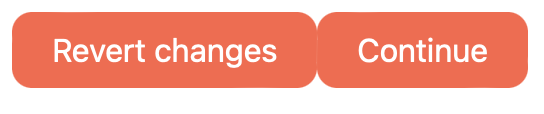
  const [value, setValue] = React.useState("Save changes");
  const changeValue = () => setValue("Revert changes");
     return(
        <div>
          <Btn text={value} changeValue={changeValue}/>
          <Btn text="Continue"/>
        </div>
   );
};
➣ changeValue는 props , 이벤트리스너 아니다 !
∴ html 태그 안에 안 들어간다
• React Memo
컴포넌트가 다시 렌더링 되는 것을 방지
<React Memo 사용 전>

➣ continue 버튼의 prop는 변경되지 않지만 리렌더링 되고 있다
<React Memo 사용 후>

➣ prop 변경되는 버튼만 리렌더링 한다
• PropType
어떤 타입의 prop을 받고 있는지 체크
<script src="https://unpkg.com/prop-types@15.7.2/prop-types.js"></script>
➣ PropTypes 설치
Btn.propTypes = {
      text: PropTypes.string,
      fontSize: PropTypes.number,
};
* 대소문자 주의 !
<Btn text="Save Changes" fontSize={18} />
<Btn text={0} fontSize={"메롱"} />
➢ .isRequired
해당 prop 반드시 제공해야 한다
Btn.propTypes = {
  text: PropTypes.string.isRequired,
  fontSize: PropTypes.number.isRequired,
};
<Btn text="Save Changes" fontSize={18} />
<Btn text={"메롱"} />
'React > 노마드코더 React' 카테고리의 다른 글
| [React] Practice Movie App (0) | 2024.07.12 |
|---|---|
| [React] Effects (0) | 2024.07.12 |
| [React] Create React App (0) | 2024.07.12 |
| [React] State (1) | 2024.06.22 |
| [React] The basic of React (0) | 2024.06.21 |